

Mega OTT Xtream Codes vs M3U: Which Connection Should You Use?
For most Mega OTT customers using a compatible IPTV player, Xtream Codes is the simpler choice. You enter a server URL, username and password, and the app requests the channels and other account content it supports. M3U is better when your player asks for a playlist link or file, rather than an Xtream API login. Both are connection formats, not different Mega OTT subscription packages.
Mega OTT supports Xtream Codes and M3U setup, but you should use the connection details supplied for your account. The app, the service and the connection format each do a different job. This comparison explains what changes in practice, including categories, the TV guide, security and troubleshooting.
Xtream Codes vs M3U at a glance
| Feature | Xtream Codes API | M3U playlist |
|---|---|---|
| Details entered | Server URL, username and password | Playlist URL or .m3u file |
| How the app gets the list | Queries the service’s API | Reads the playlist’s stream entries |
| Channel categories | Usually delivered as structured API data | Possible through group-title tags |
| Movies and series | Can be presented as dedicated libraries | Depends on playlist contents and player support |
| TV guide (EPG) | Available when the service and player support it | Can use an included or separately supplied XMLTV link |
| Changes to channels | Reflected when the player refreshes API data | Reflected when the player reloads the playlist URL; local files need updating |
| Best use | Dedicated players with Xtream login | Players that import playlist links or files |
In an M3U vs Xtream API comparison, the main distinction is how a player receives the channel information. The same subscription can potentially be provided in either format, but the available formats must be confirmed with Mega OTT. Neither method guarantees specific channels, uninterrupted playback or a particular streaming quality.
How a Mega OTT Xtream Codes login works
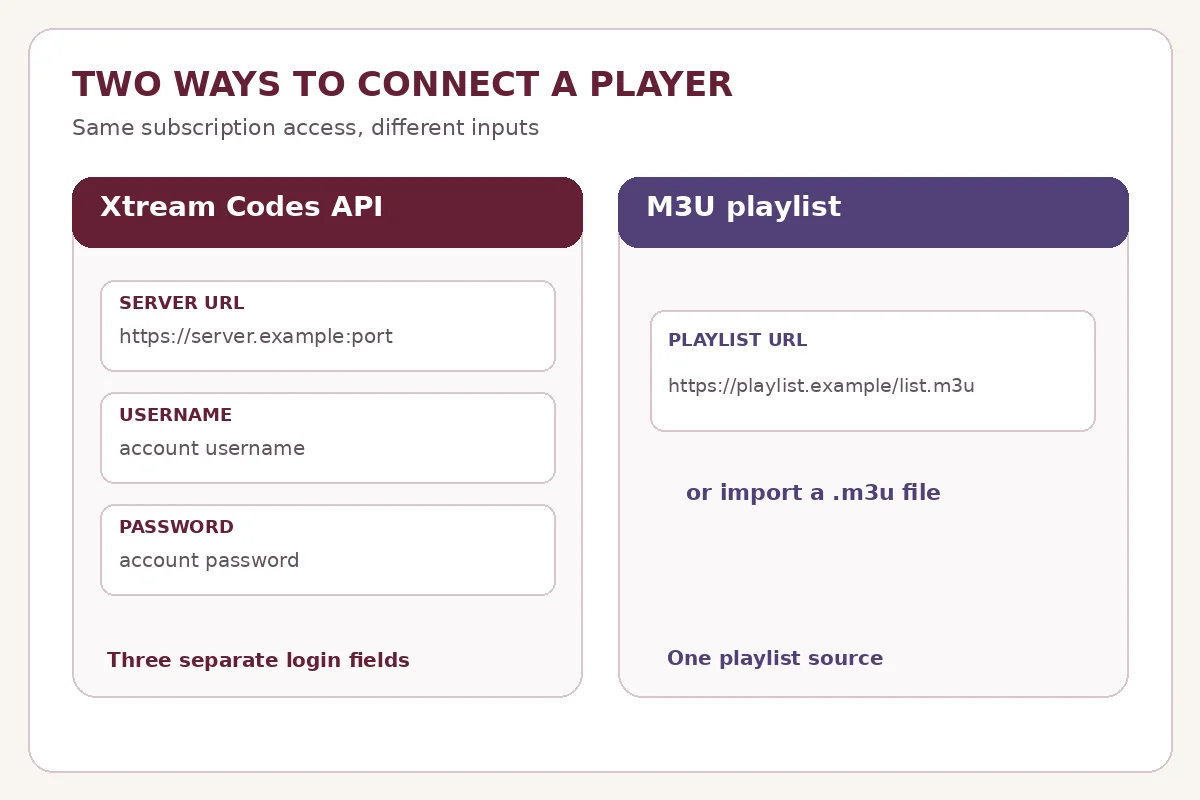
The Xtream Codes login format uses three fields supplied privately after your account is activated:
- Server URL: The service address, including the port if one is provided.
- Username: The account identifier issued for your subscription.
- Password: The password paired with that account.
In a compatible player, choose an option labelled Xtream Codes, Xtream API or similar, and enter the three fields. The player then requests available content and categories through the service’s API. Some players can show account details, films, series or EPG data when the service exposes them. Those features are not guaranteed by the login format alone.
For a screen-by-screen explanation and common login errors, see our Mega OTT Xtream Codes login guide. The iptv-org documentation also illustrates the underlying URL pattern, although customers should not build their own login addresses from unverified examples.
How a Mega OTT M3U playlist works
A Mega OTT M3U playlist is a URL or text file that tells a compatible player which streams to load. For an online playlist, the player downloads the list from the supplied URL. An imported local file is a snapshot until you replace it or import an updated version.
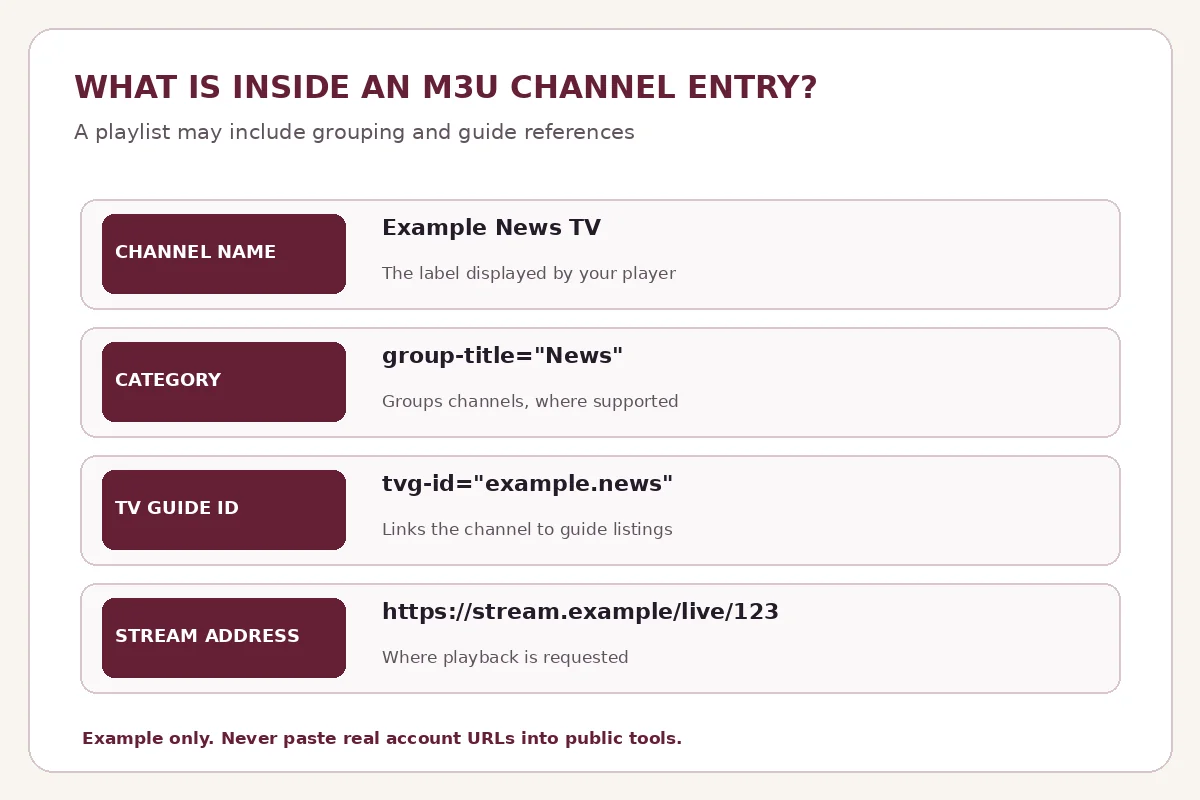
Extended M3U playlists commonly include a channel name, stream address and optional metadata. For example, group-title can sort channels into Sports or News, while tvg-id can help match channels to an electronic programme guide. The OTT Navigator format reference documents these fields, and iptv-org’s playlist guide shows the text-file structure.
This means the claim that M3U has no categories or EPG support is incorrect. What you actually see depends on the information in the playlist, whether a guide source is available and how the chosen player interprets it. A player such as VLC can open network streams, but it is not a substitute for a dedicated TV-guide interface.
A provider-issued M3U URL may contain credentials within its address. Treat the full link like a password. Don’t post it publicly, include it in screenshots or paste it into unknown online converters.
Which Mega OTT connection type should you choose?
Choose Xtream Codes for a dedicated IPTV player
Select Xtream if the player has a dedicated API-login option and Mega OTT has issued the appropriate credentials. This is usually the more convenient method for a television-oriented app because categories and on-demand libraries can be requested separately instead of being interpreted from a single playlist. On Android TV or Google TV, TiviMate is one example of a dedicated player; its Google Play listing makes clear that it provides the viewing application, not the channel subscription.
Choose M3U when the player asks for a playlist
Use an M3U URL or file when the app’s setup screen has Add playlist, Open network stream or Import M3U, but no Xtream login. This can be practical for desktop playback and for apps where you prefer to manage a playlist directly. Request the complete Mega OTT playlist URL rather than trying to turn a username and password into a URL yourself.
Ask about Stalker/MAC separately
Mega OTT also discusses a Stalker portal / MAC-address option for compatible devices. That is a separate connection method: a portal URL and registered MAC address are not interchangeable with either the Xtream fields or an M3U playlist. Ask support to confirm your player and device before choosing that method.
Mega OTT IPTV playlist setup: quick steps
- Check your app’s login screen. Identify whether it accepts Xtream Codes, M3U, or both.
- Request the matching format. Tell Mega OTT your device, app name and account details used for the order. Never share a password in a public comment.
- Enter the exact information provided. For Xtream, use the three separate fields. For M3U, paste the complete playlist URL or import the file.
- Refresh the channel data. Allow the player to load the list; check the category and EPG settings if present.
- Test a channel and a second category. A successful login does not confirm that every requested channel is included. Verify specific requirements with support.
Need activation first? The Mega OTT activation guide explains when account details are issued. For subscription options, see Mega OTT pricing.
Common format and loading problems
Xtream login rejected: Check the server URL, protocol, port, username and password exactly. Confirm that the account is active and that the app is set to Xtream, not M3U. See the dedicated login troubleshooting instructions.
M3U playlist won’t load: Make sure the entire URL was copied. Check internet connectivity and whether the link was changed or expired. A network playlist needs a reachable server; a local file can be outdated.
Channels appear but the TV guide is empty: Look for a guide refresh option and check whether a separate EPG/XMLTV address was supplied. An M3U tag can point to guide data, but it doesn’t create a guide. Xtream API support also doesn’t guarantee guide entries for every channel.
The list looks different between apps: Different players interpret categories, logos, VOD and series metadata differently. This is not necessarily a subscription problem. Compare the same account using the correct login format and contact support if expected categories are absent.
Two TVs cannot play simultaneously: Switching from Xtream to M3U does not increase the subscription’s connection allowance. Standard Mega OTT pricing is for one simultaneous stream; additional connections are quoted separately.
Is Xtream more secure or faster than M3U?
Neither name guarantees stronger security or faster playback. An M3U URL may expose account details if shared; Xtream credentials can also be stolen if disclosed. Use trusted apps, protect your login and prefer secure connections wherever available. Playback performance depends on the stream source, network, device and player—not just whether you signed in through an API or a playlist URL.
Conclusion
Choose Xtream Codes if your player supports it and Mega OTT has supplied the three login fields. Choose M3U when the player needs a playlist URL or file, or when that is the connection supplied for your device. Both can provide channel groups and guide information when the service and application support them; the visible differences mainly come from how the app imports and organizes that data.
Before setup, tell Mega OTT support your device model and player name. That is more reliable than experimenting with made-up playlist links or login details.